Online/digital access and self-service
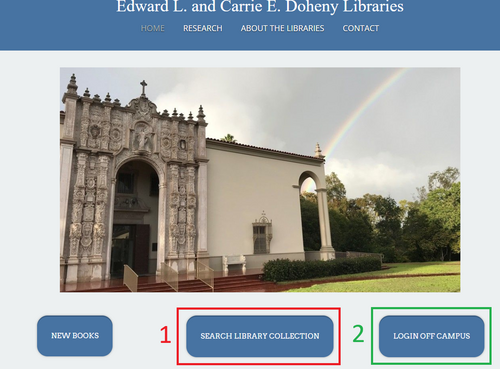
First time access & logging in
- Go to Library Homepage: library.stjohnsem.edu
- Click LOGIN OFF CAMPUS link (in GREEN BOX #2 above)
- Enter your library card barcode
Password: (you select)
If you do not have a password (if this is your first time using the system) then click the Request Password link and, by entering your username (barcode #) you will receive an email to set up a new password.
If you experience any technical issues, contact the library staff and let us know how we can help. (When requesting technical assistance, include as much detail as possible.)
Renewing items
- Go to Library Homepage
- Click SEARCH LIBRARY COLLECTION (in RED BOX #1 above)
- Go to (My Library Account Sign in ) (upper right corner of page):

- Once logged in; Click on My Account; then select "Checkouts" to see all items checked out to you:
- Click Renew if you would like to renew any of your library items.
